
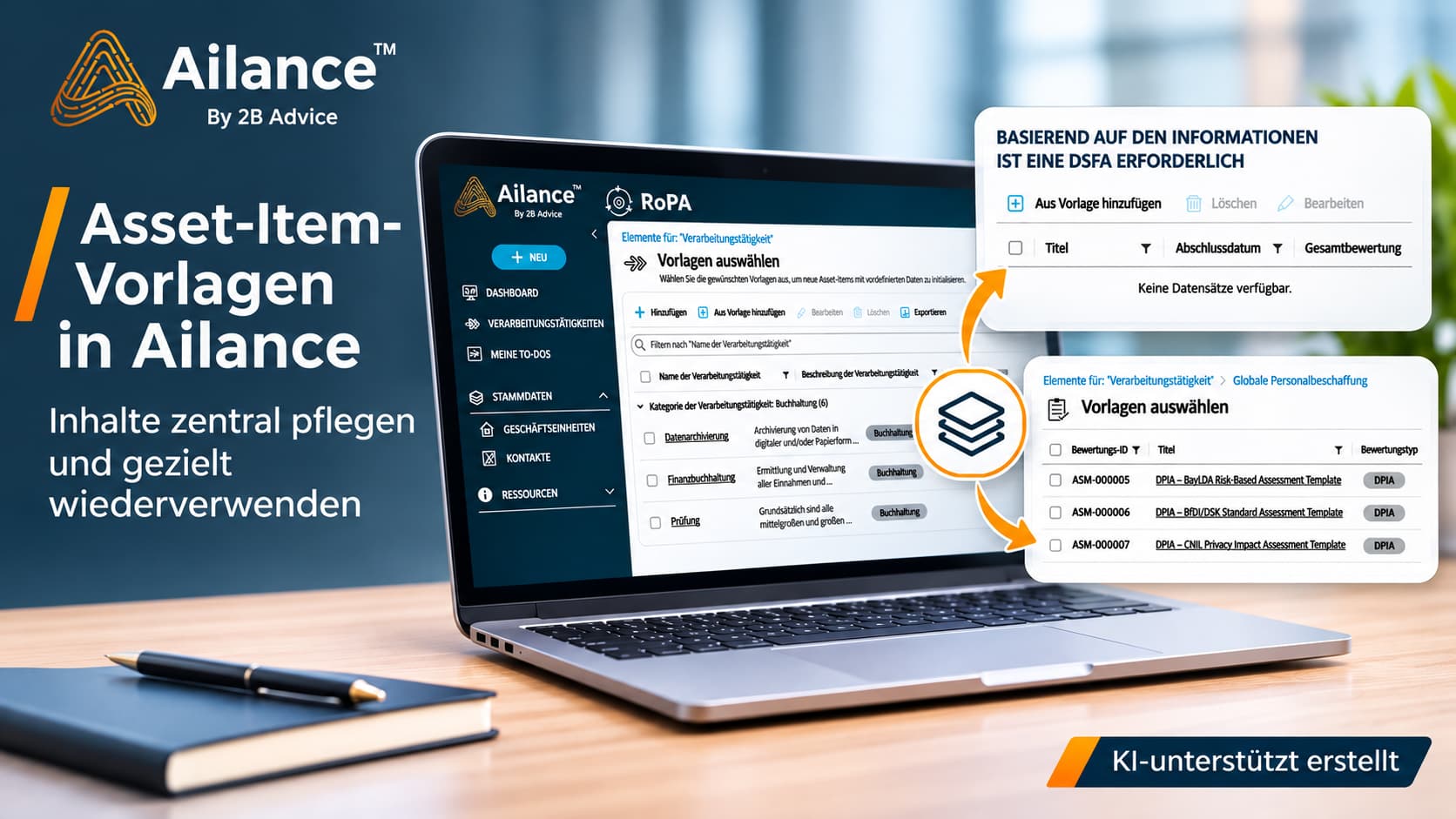
Asset-Item Templates in Ailance: Centralized Content Management and Targeted Reuse
With the Documentation When it comes to processing activities, technical and organizational measures, or IT assets, content that has already been developed elsewhere is frequently required. If this content is re-entered for each use case or copied from existing entries, it results in additional administrative work. At the same time, this can lead to different versions, the ongoing maintenance of which is not uniformly regulated.
Asset-item templates in Ailance make it possible to provide such content as predefined data records and use them for new entries as needed. You can specify which fields can be edited individually after the data is imported and which remain linked to the centrally maintained template.
Select Templates Based on Specific Criteria
Fully preloaded sample catalogs can make it easier to get started with a solution. However, they also result in directories containing entries that are not needed by the respective company. Users must first review these entries, distinguish them from the processes actually in use, and remove them if necessary.
Asset-item templates provide a selection of pre-prepared content without automatically creating operational entries. Using the „Add from Template“ action, users can apply the templates that are appropriate for their specific use case. Depending on the selection field, this can be done for a single template or for multiple templates at once.
A separate entry is created based on the selected template. This entry can then be supplemented with company-specific information. For a processing activity, for example, a prepared description of the typical process may be used, while the responsible department adds the systems, recipients, and operational processes actually in use.
The template thus provides a common technical starting point and can reduce the effort required for data entry as well as inquiries regarding basic information. Whether the content included accurately describes the specific circumstances must still be verified during processing.
Incorporation as a copy or reference
When maintaining reusable content, the key consideration is how subsequent changes to a template affect the entries created from it. Ailance distinguishes between two methods for this, which the Solution Builder configures for the relevant fields.
When copying, the field value from the template is copied to the new entry. It can then be edited independently there. Subsequent changes to the template do not affect the local value.
When a field value is copied by reference, it remains linked to the template. If this value is changed in the template, the change is also applied to the entries created from it. In the individual entry, the field in question is read-only; it is maintained via the template.
Both methods can be used within a single entry. For example, the general description of a security measure can be maintained centrally, while Responsible persons, the status of implementation and evidence of each specific application are documented separately. This ensures that common guidelines remain consistent without requiring the details of specific implementation to be standardized.
Use Cases in Data Protection, AI Governance, ITASMA, and ISMS
The templates available depend on the content that has been stored and the configuration of the respective solution. The following examples show how the feature can be used.
Data Processing Activities in Data Protection Management
For recurring processes such as applicant management, human resources administration, or customer service, templates with standard descriptions can be provided. The departments select the appropriate template and adapt the information to the actual Processing within the company. This simplifies data entry and supports a consistent description of comparable processes.
Technical and Organizational Measures
When compiling TOMs, users can select appropriate measures from predefined libraries, such as those for access control or data erasure. This means that a complete catalog of measures does not have to be adopted in its entirety. While the description of the measure can be maintained centrally, its specific implementation and the associated evidence are documented in the respective context.
AI Governance
For recurring AI use cases—such as an internal AI assistant or a chatbot in customer service—data collection and testing criteria can be prepared. These include, for example, questions about the intended use, the data used, and human oversight. The responsible teams add the actual characteristics of the application and the results of their review. A common set of questions helps ensure the comparability of different AI applications.
ITASMA
For similar IT assets such as laptops, servers, or SaaS applications, typical descriptions and standard details can be saved as templates. The specific details—such as the device ID, location, or person in charge—are added during data entry. This eliminates the need to re-enter recurring information for each asset; at the same time, it allows for more consistent documentation of the inventory.
ISMS
For information security management, templates for recurring security controls and internal audit questions are particularly useful. A centrally maintained control description can be used across multiple areas, while the implementation status, supporting documentation, and pending actions are each documented separately.
Permissions and Behavior During Updates
Template management is subject to its own permissions. This allows you to specify which users are authorized to maintain central content and which users may use it to create their own entries.
Templates that are no longer needed can be deactivated. They will then no longer be available for new selections, but will remain in place for existing uses. The deactivated status is retained when the solution is imported again. A template that has been intentionally deactivated will therefore not be reactivated by an update.
For companies, the main benefit lies in the ability to reuse existing expertise and assign responsibility for maintaining it within the organization. Recurring content is prepared centrally; the departments then supplement the information as needed for their specific Processing, an application or action is required. This requires an appropriate division between centrally maintained specifications and information to be processed locally.
Questions and Answers
What are asset-item templates in Ailance?
Asset-item templates are predefined data records that can be reused for new entries. They provide a common business foundation, eliminating the need to re-enter the same information for each use case.
What is the difference between copying and referencing?
When you create a copy, the field value is transferred to the new entry once and can be edited independently there. When you create a reference, the field value remains linked to the central template. Changes made to the template are then also reflected in the linked entries.
Can copies and references be combined within a single entry?
Yes. Information that needs to be maintained centrally can be incorporated as a reference, while company- or application-specific information can be edited independently within the respective entry. This allows common guidelines and individual implementations to be combined.
In which areas can asset-item templates be used?
Asset-item templates can be used, among other things, for processing activities, Technical and organizational measures, AI Governance, ITASMA, and ISMS. The templates available depend on the content stored and the specific configuration.
What happens to existing entries when a template is deactivated?
A deactivated template is no longer available for new selections. However, existing instances of the template remain intact. The deactivated status is retained even if the solution is imported again.

 German
 Italian
 French
 English